
Improve site speed 34% lazy loading videos
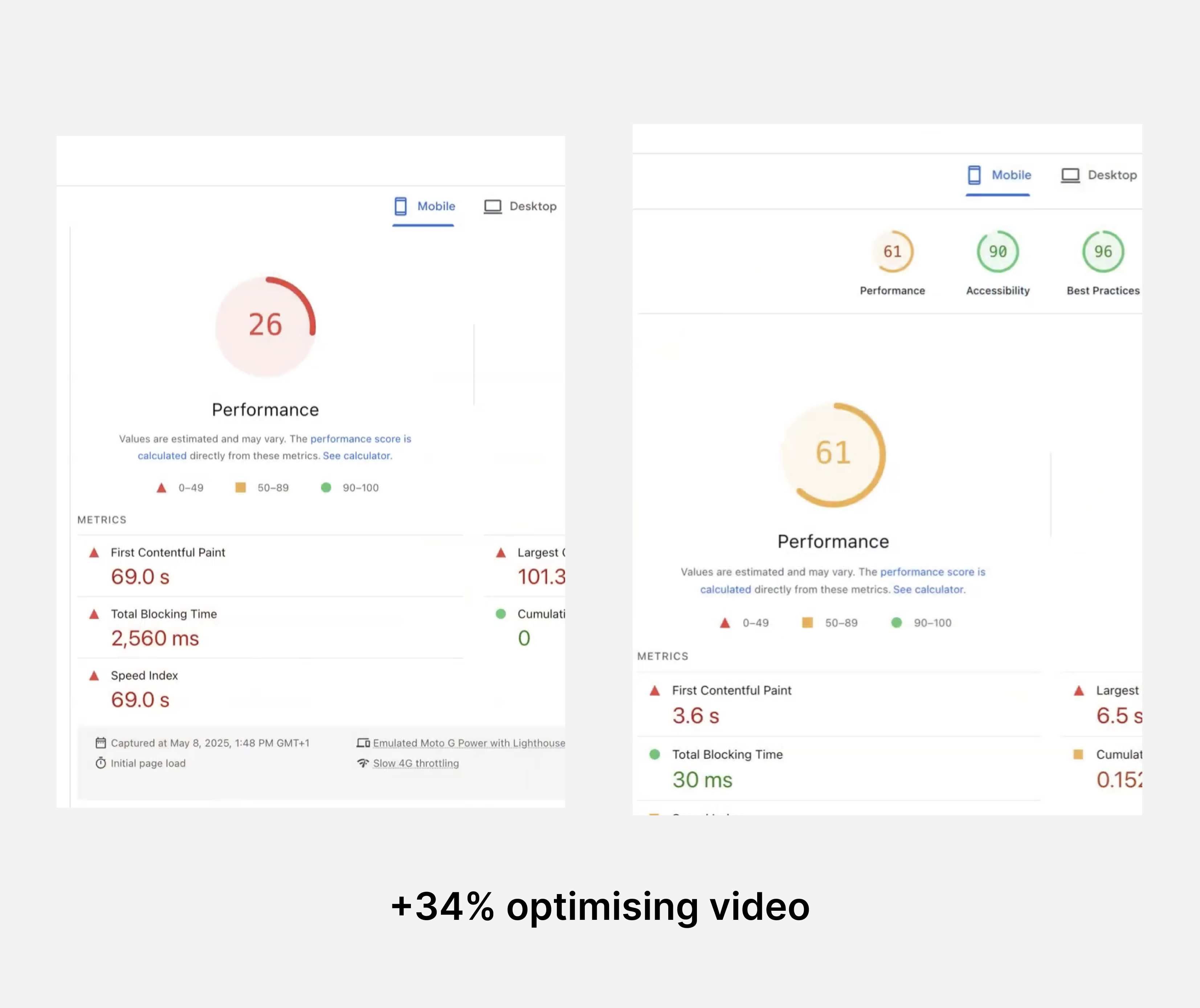
How to improve site speed 34% lazy loading videos. Free code snippet included.
Heavy video files can destroy site performance. Here's a copy+paste solution that loads videos only when users actually want to watch them.
Your Shopify store probably has videos. Product demos, hero sections, customer testimonials - video content converts well, but it comes with a massive performance cost.
Here's the problem: when you embed a video directly on your page, the browser downloads the entire video file during the initial page load. Even if the visitor never clicks play.
A typical product demo video is 5-15MB. If you have a hero video plus a few product demos, you're looking at 30-50MB of video content downloading before users can even interact with your page. On slower connections, that's a 5-10 second delay where visitors see loading spinners instead of your products.
The solution isn't removing videos (they're too valuable for conversions). The solution is loading them intelligently.
The Video Loading Problem
When you add videos to your Shopify theme, here's what happens:
- User visits your page
- Browser starts downloading every video file immediately
- Page appears to be loading while videos download in background
- User sees blank spaces or loading placeholders
- Videos finally appear after several seconds
This happens whether the user wants to watch the videos or not. Most visitors will scroll past videos without watching them, but they still pay the performance penalty.
Why Lazy Loading Videos Matters
The Core Benefits:
- Faster initial page loads - no video downloads until needed
- Improved Core Web Vitals - better LCP and TBT scores
- Data-friendly browsing - respects users on limited data plans
- Smoother page interactions - no video processing blocking the UI
Where This Makes the Biggest Impact:
- UGC carousels with multiple videos
- Hero sections with large video files
- Product pages with demo videos
- Any below-the-fold video content
Where to Use Video Facades
UGC Carousels
Multiple customer videos in carousels create the biggest performance hit. If you're showing 5-10 testimonial videos, users can only watch one at a time anyway.
Hero Section Videos
Large brand or product videos look stunning but can delay your entire page load. A facade shows the visual impact immediately while loading the video on-demand.
Product Demo Videos
Below-the-fold product videos often download without users ever scrolling to see them. Load them only when users reach that section.
Autoplay vs Click-to-Play
The facade component supports both loading strategies:
Autoplay Mode
- Best for: Atmospheric brand videos, hero sections
- Behavior: Waits for page to finish loading, then auto-starts
- Setup: No controls, muted, loops continuously
- Goal: Create ambiance without disrupting the browsing experience
Click-to-Play Mode
- Best for: Product demos, tutorials, testimonials
- Behavior: Only loads when user actively clicks the play button
- Setup: Full video controls, user manages audio
- Goal: Maximize performance by loading only when requested
The Copy+Paste Solution
Save this as snippets/video-facade.liquid in your theme:
{% comment %}  Video Facade Liquid Snippet for Shopify

  USAGE:
  {% render 'video-facade',
    video_url: 'https://cdn.shopify.com/videos/demo.mp4',
    poster_url: 'https://cdn.shopify.com/images/poster.jpg',
    autoplay: false,
    alt_text: 'Product demonstration video'
  %}
{% endcomment %}

{%- liquid
  assign video_url = video_url | default: ''
  assign poster_url = poster_url | default: ''
  assign autoplay = autoplay | default: false
  assign alt_text = alt_text | default: 'Video thumbnail'
  assign width = width | default: 800
  assign height = height | default: 450
  assign class = class | default: ''
  assign unique_id = id | default: 'video-facade-' | append: forloop.index | append: '-' | append: 'now' | date: '%s'
-%}

{%- if video_url != blank and poster_url != blank -%}

<div class="video-facade {{ class }}"
     id="{{ unique_id }}"
     data-video-src="{{ video_url | escape }}"
     data-autoplay="{{ autoplay }}">

  <div class="video-poster">
    <img
      src="{{ poster_url | img_url: width }}"
      alt="{{ alt_text | escape }}"
      width="{{ width }}"
      height="{{ height }}"
      loading="lazy"
      fetchpriority="low"
      style="width: 100%; height: 100%; display: block; object-fit: fill;"
    >

    <div class="play-button-overlay" style="display: {% if autoplay %}none{% else %}block{% endif %};">
      <svg width="60" height="60" viewBox="0 0 60 60" style="cursor: pointer;" aria-label="Play video">
        <circle cx="30" cy="30" r="30" fill="rgba(0,0,0,0.8)"/>
        <polygon points="23,18 23,42 42,30" fill="white"/>
      </svg>
    </div>
  </div>

  <div class="video-container" style="display: none;"></div>
</div>

{%- unless template contains 'video-facade-styles' -%}
  {{ 'video-facade-styles' | append: template | assign: template }}
  <style>
    .video-facade {
      position: relative;
      width: 100%;
      height: 100%;
      margin: 0 auto;
      background: #f8f8f8;
      border-radius: 8px;
      overflow: hidden;
    }

    .video-facade .video-poster {
      position: relative;
      width: 100%;
      height: 100%;
      cursor: pointer;
      transition: opacity 0.3s ease;
    }

    .video-facade .video-poster:hover {
      opacity: 0.95;
    }

    .video-facade .play-button-overlay {
      position: absolute;
      top: 50%;
      left: 50%;
      transform: translate(-50%, -50%);
      z-index: 2;
      transition: all 0.3s ease;
    }

    .video-facade .play-button-overlay:hover {
      transform: translate(-50%, -50%) scale(1.1);
      opacity: 0.9;
    }

    .video-facade .video-container {
      width: 100%;
      height: 100%;
    }

    .video-facade .video-container video {
      width: 100%;
      height: 100%;
      display: block;
      object-fit: fill;
      border-radius: inherit;
    }

    .video-facade.loading .video-poster::after {
      content: '';
      position: absolute;
      top: 0;
      left: 0;
      right: 0;
      bottom: 0;
      background: rgba(255,255,255,0.8);
      display: flex;
      align-items: center;
      justify-content: center;
    }

    @media (max-width: 768px) {
      .video-facade .play-button-overlay svg {
        width: 50px;
        height: 50px;
      }
    }

    .video-facade * {
      backface-visibility: hidden;
      perspective: 1000px;
    }
  </style>
{%- endunless -%}

{%- unless template contains 'video-facade-script' -%}
  {{ 'video-facade-script' | append: template | assign: template }}
  <script>
    (function() {
      'use strict';

      function debounce(func, wait) {
        let timeout;
        return function executedFunction(...args) {
          const later = function() {
            clearTimeout(timeout);
            func(...args);
          };
          clearTimeout(timeout);
          timeout = setTimeout(later, wait);
        };
      }

      function initVideoFacades() {
        const facades = document.querySelectorAll('.video-facade:not([data-initialized])');

        facades.forEach(function(facade) {
          const videoSrc = facade.getAttribute('data-video-src');
          const isAutoplay = facade.getAttribute('data-autoplay') === 'true';
          const poster = facade.querySelector('.video-poster');
          const playButton = facade.querySelector('.play-button-overlay');
          const videoContainer = facade.querySelector('.video-container');

          if (!videoSrc) return;

          facade.setAttribute('data-initialized', 'true');

          function loadVideo() {
            if (videoContainer.querySelector('video')) return;

            facade.classList.add('loading');

            const video = document.createElement('video');
            video.src = videoSrc;
            video.preload = 'none';
            video.style.width = '100%';
            video.style.height = '100%';
            video.style.objectFit = 'fill';

            if (isAutoplay) {
              video.autoplay = true;
              video.muted = true;
              video.loop = true;
              video.controls = false;
              video.playsInline = true;
              video.setAttribute('webkit-playsinline', 'true');
            } else {
              video.controls = true;
            }

            if (video.fetchPriority !== undefined) {
              video.fetchPriority = 'high';
            }

            video.addEventListener('loadedmetadata', function() {
              poster.style.display = 'none';
              videoContainer.style.display = 'block';
              facade.classList.remove('loading');

              video.play().catch(function(error) {
                console.warn('Video autoplay failed:', error);
              });
            });

            video.addEventListener('error', function() {
              facade.classList.remove('loading');
              console.warn('Video failed to load:', videoSrc);

              if (playButton) {
                playButton.innerHTML = '<span style="color: red; font-size: 14px;">Video unavailable</span>';
              }
            });

            video.addEventListener('play', function() {
              if (typeof gtag !== 'undefined') {
                gtag('event', 'video_play', {
                  'video_url': videoSrc,
                  'autoplay': isAutoplay
                });
              }
            });

            videoContainer.appendChild(video);
            video.load();
          }

          if (isAutoplay) {
            if (document.readyState === 'complete') {
              requestAnimationFrame(function() {
                setTimeout(loadVideo, 200);
              });
            } else {
              window.addEventListener('load', function() {
                requestAnimationFrame(function() {
                  setTimeout(loadVideo, 200);
                });
              });
            }
          } else {
            const clickHandler = debounce(loadVideo, 100);
            poster.addEventListener('click', clickHandler);

            if (playButton) {
              playButton.addEventListener('click', function(e) {
                e.stopPropagation();
                clickHandler();
              });
            }
          }
        });
      }

      if (document.readyState === 'loading') {
        document.addEventListener('DOMContentLoaded', initVideoFacades);
      } else {
        initVideoFacades();
      }

      document.addEventListener('shopify:section:load', initVideoFacades);
      document.addEventListener('shopify:block:select', initVideoFacades);

    })();
  </script>
{%- endunless -%}

{%- else -%}
  <div style="padding: 20px; background: #f8f8f8; border: 1px solid #ddd; text-align: center;">
    <p><strong>Video Facade Error:</strong> Missing video_url or poster_url</p>
  </div>
{%- endif -%}
Implementation Guide
Step 1: Backup Your Theme
⚠️ Always duplicate your theme before making changes
- Go to Online Store > Themes
- Click Actions on your active theme
- Select Duplicate
- Work on the duplicated version
Step 2: Create the Video Facade Snippet
- In your theme editor, go to snippets folder
- Click Add a new snippet
- Name it:
video-facade - Copy and paste the complete code above
- Save the file
Step 3: Use the Snippet in Your Templates
Product Page Example:
<div style="height: 400px; width: 100%;">
  {% render 'video-facade',
    video_url: product.metafields.custom.demo_video,
    poster_url: product.metafields.custom.video_poster,
    autoplay: false,
    alt_text: product.title | append: ' demonstration'
  %}
</div>
Hero Section Example:
{% render 'video-facade',
  video_url: section.settings.hero_video_url,
  poster_url: section.settings.hero_poster,
  autoplay: true,
  alt_text: 'Brand introduction video'
%}
UGC Carousel Example:
{% for video in collection.metafields.custom.customer_videos.value %}
  <div class="carousel-item">
    {% render 'video-facade',
      video_url: video.file,
      poster_url: video.preview,
      autoplay: false,
      alt_text: 'Customer testimonial ' | append: forloop.index
    %}
  </div>
{% endfor %}
Creating Video Poster Images
You need a poster image for each video. Here's how to get them:
Method 1: Save Frame from Browser
-
Play your video in any web browser
-
Pause at the frame you want (avoid text overlays or transitions)
-
Right-click the video
-
Select "Save frame as..." or "Save image as..."
-
Save as JPG and upload to your Shopify Files
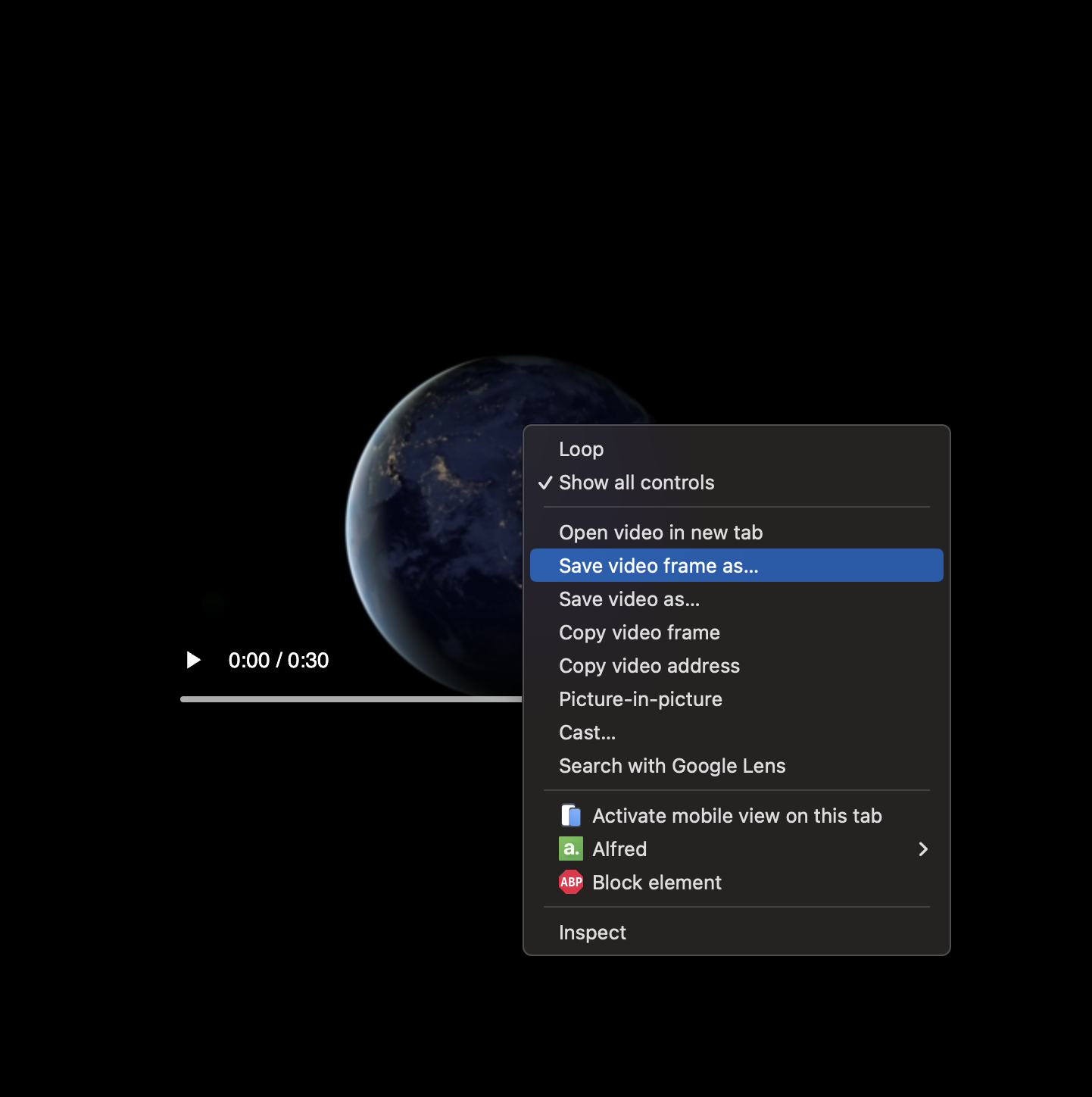 Screenshot_2025-08-27_at_11.33.56.png
Method 2: Video Editor Export
- Open video in any editing software
- Navigate to desired timestamp
- Export single frame as image
- Compress image for web use
Method 3: Online Tools
- Use tools like Kapwing or EZGIF to extract frames
- Upload video, select timestamp, download frame
- Optimize resulting image before using
Pro tip: Choose a compelling frame that represents the video content - avoid black screens, loading states, or heavily text-based frames.
Configuration Options
The snippet accepts these parameters:
video_url- Direct path to your video file (required)poster_url- Poster image URL (required)autoplay- true/false, defaults to falsealt_text- Screen reader descriptionwidth/height- Dimensions for optimization (defaults: 800x450)class- Additional CSS classes for stylingid- Unique identifier if needed
Performance Impact
Before implementing video facades:
- Large video files download immediately on page load
- Multiple videos compete for bandwidth
- Page appears slow to load while videos download
- Users may bounce before content becomes interactive
After implementing video facades:
- Only lightweight poster images load initially
- Videos download on-demand when users interact
- Page loads and becomes interactive immediately
- Better user experience leads to improved engagement
Testing Your Implementation
- Use browser dev tools to check network activity
- Verify videos don't download until clicked/triggered
- Test on slower connections to see the performance difference
- Check mobile experience - this is where you'll see the biggest gains
The goal is fast initial page loads with rich video content available when users want it. This approach gives you the conversion benefits of video without the performance penalties.
This solution works for any Shopify theme and integrates with existing video setups. The lazy loading approach ensures your site stays fast while keeping all the engagement benefits of video content.