
Fix Your Slow LCP Score in 10 Minutes (Free AI Tool Inside)
Adding a delivery estimate to your PDPs. This tutorial will show you how to do it without a developer in 5 minutes.
Fix Your Slow LCP Score in 10 Minutes (Free AI Tool Inside)
What is LCP and Why It Matters
LCP (Largest Contentful Paint) measures how long it takes for the biggest visual element on your page to load. This is usually your hero image, main product photo, or banner.
Google uses LCP as a major ranking factor, but here's what really matters - slow LCP kills conversions. When your main image takes forever to load, people bounce before they even see what you're selling.
The Image Problem Everyone Has
Most websites serve images that are way too big. You upload a 3000x3000px product photo, but people on mobile only see it at 400x400px. They're still downloading the massive file though.
It's like forcing someone to download a 4K movie when they're watching on a tiny screen. Pure waste.
How Image Optimization Improves LCP
When you resize images to match how they're actually displayed:
- Faster downloads - smaller files load quicker
- Less bandwidth waste - no unnecessary data transfer
- Better LCP scores - your main content appears faster
- Higher conversions - people see your products sooner
The trick is knowing which images to optimize first. That hero banner might look like the obvious culprit, but sometimes it's actually your product gallery doing the most damage.
Our AI Code Snippet
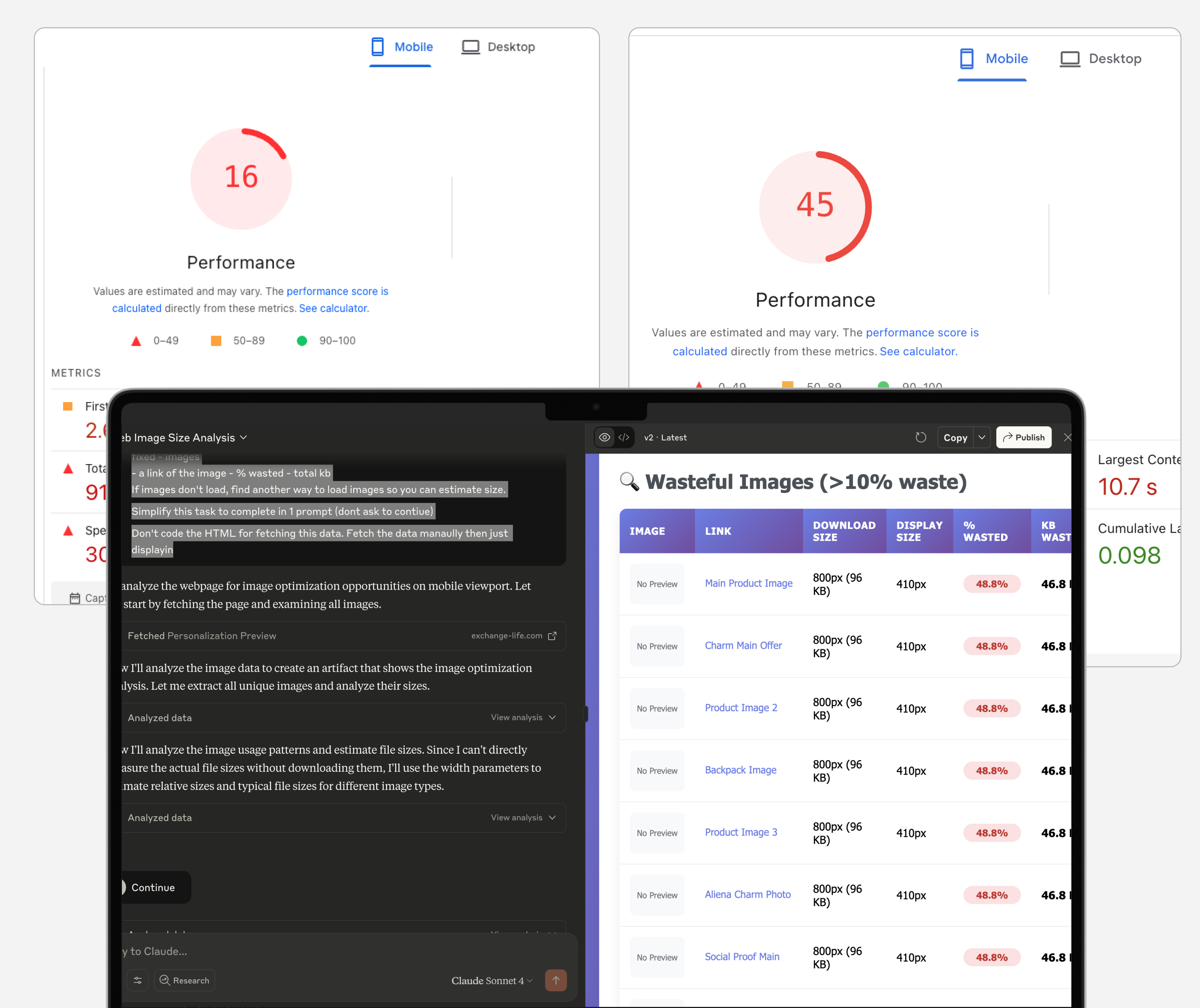
We built an AI prompt that scans any webpage and finds every oversized image. It shows you:
- Current file sizes vs optimal sizes
- Which images waste the most bandwidth
- Priority order for fixes (biggest impact first)
- Estimated LCP improvement for each fix
Scan the page source code and look for all <img> tags. For each img src, check the intrinsic size of the image. Then using the browser - see how big the image display is.

We're looking for wasted download bytes on images that are too large for their container. If any image is > 10% larger than it's viewport, add it to a list. This list should then be shown at the end, displaying what % of the image is wasted, and total kb wasted by image. Display as a table with the img embedded, so we can see the image. Do a comprehensive search for ALL images. When showing how many wasted KB there is - show the total amount of KB downloaded by the browser. Convert to MB if larger than 1k KB. Using the total download size, estimate how much could be saved by optimising images. Then use this number (weighted at 50) to estimate how much LCP could be saved. For example if 25% of images are wasted, this would be 12.5% of LCP savings potential. It's imperative that the images load.

Do this for a mobile viewport of 410px.

Images should not have any cors errors, find a better way to abstract the image. If images are not downloading, repeat and fix until images are all there.

Create a visual representation but do not add any additional data. Show - total images
- total mb downloaded - total mb wasted - total waste % - estimate of LCP savings if fixed - images
- a link of the image - % wasted - total kb
If images don't load, find another way to load images so you can estimate size.

Simplify this task to complete in 1 prompt (dont ask to contiue)

Don't code the HTML for fetching this data. Fetch the data manually then just displaying

Using this URL: {YOUR URL HERE}
How to Use It
Step 1: Use Claude AI
- Go to Claude.ai (needs to be an AI tool that can browse websites)
- Copy and paste our prompt
- Add your webpage URL at the end (should use PDP)
Step 2: Handle Long Responses
- The analysis can be detailed, so Claude might stop mid-response
- If it says something like "Continue?" or cuts off, just type "continue"
- Do this a few times until you get the complete analysis
Step 3: Review All Images
You'll get a complete breakdown showing:
- Every image on your page
- Current dimensions and file sizes
- How much data each image wastes
- Which ones to fix first for maximum impact
Step 4: Start Optimizing
Take the top 3-5 worst offenders and resize them to the recommended dimensions. You'll see some big improvement from just these key fixes.
Implementation Tips
- Start with the highest-impact images first
- Don't try to fix everything at once - focus on the big wins
- Mobile optimization usually matters more than desktop
- Re-run the analysis after fixes to see your progress
The whole process takes about 10 minutes to identify problems, then however long you want to spend actually fixing images.
How do I resize my images?
The next issue is generally - how do I resize all my images? Don’t worry - we’ve got a special post with a code snippet you can use on Shopify to size images properly. Just click here https://www.bs-devshop.com/blog/img-compressor-snippet
Using this prompt will let you see all the images on your website, and highlight how much waste they’re causing.
You can use this to fix your LCP in 2 ways
- Review your images and figure out if you REALLY need them all
- Properly size image so you’re not wasting all that bandwidth
If you need help with properly sizing images, we have a code snippet you can use on Shopify. Simple copy + paste job that will massively reduce all image sizes you’re using:hthttps://www.bs-devshop.com/blog/img-compressor-snippet
Next Steps After Running the Analysis
Immediate Actions:
- Screenshot your results so you don't lose them
- Start with the top 3 images the AI flags as worst offenders
- Resize those images to the recommended dimensions
- Re-upload and test your page speed
Week 1 Follow-up:
- Run the analysis again to see your improvement
- Tackle the next 5-10 images on the priority list
- Check your LCP score in Google PageSpeed Insights
- Monitor any changes in conversion rates
Ongoing Optimization:
- Run this analysis on your other key pages (homepage, top product pages, checkout)
- Set a monthly reminder to check for new oversized images
- Train your team to resize images before uploading
- Consider setting up automated image optimization if you upload frequently
When to Get Help:
If you're seeing tons of oversized images but don't have time to fix them all, or if the technical side feels overwhelming, that's where BS Devshop comes in. We've optimized hundreds of sites and can knock out all your image optimizations in one go rather than you doing it piecemeal. Get in touch through our website and we'll take care of the whole process for you.
Track Your Progress:
Keep an eye on your Core Web Vitals scores over the next few weeks. LCP improvements usually show up pretty quickly once you fix the major image issues.
The best part about this approach? You only need to do the detective work once. The AI tells you exactly what to fix, so no more guessing which images actually matter.